
SQL Server数据库是如何合并表格数据的呢?其实SQL Server数据库合并表格数据是利用ROW_NUMBER来实现的,本文我们通过一个例子来介绍如何合并表格数据。我使用的数据库版本是SQL Server 2005,表格的原始数据如下:

这个一个学习和测试的记录,Type是类型(0学习,1测试)。一天中可能会学习多次,也可能会测试多次,学习次数和测试次数可能不一样。
想要的到得是,按日期列出当天学习和测试的记录。
类似这样的结果:(图中两行数据一样,是两种语言表示)
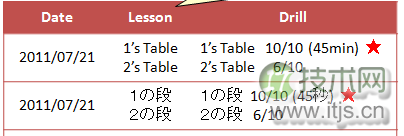
主要的SQL语句如下:
select A.Date,A.MID,A.Contents1,B.Contents2,B.Passed from (select ROW_NUMBER() over(partition by Date order by Date) as MID,Date,Contents as Contents1 from History where Type=0 ) A left join (select ROW_NUMBER() over(partition by Date order by Date) as MID,Date,Contents as Contents2,Passed from History where Type=1 ) B on A.Date=B.Date and A.MID=B.MID union select B.Date,B.MID, A.Contents1,B.Contents2,B.Passed from (select ROW_NUMBER() over(partition by Date order by Date) as MID,Date,Contents as Contents1 from History where Type=0 ) A right join (select ROW_NUMBER() over(partition by Date order by Date) as MID,Date,Contents as Contents2,Passed from History where Type=1) B on A.Date=B.Date and A.MID=B.MID
结果如下:

至此,表格的数据已经合并完毕了。
关于SQL Server数据库合并表格数据的知识就介绍到这里,假如您想了解更多关于SQL Server数据库的知识,可以看一下这里的文章:http://database.51cto.com/sqlserver/,相信一定会带给您收获的!