
当SQL Server因系统资源不足,或其它异常导致无法建立数据库连接时, 可以使用系统预留的DAC连接到数据库,进行一些问题诊断和故障排除。DAC只能使用有限的资源。请勿使用DAC运行需要消耗大量资源的查询,否则可能发生严重的阻塞。可在联机帮助中搜索DAC。
建议使用命令行下的sqlcmd连接进去,因为占用的资源更少,连接方法:开始 --> 运行 --> cmd 输入SQLCMD -E -SMQLinstance1 -A&(说明,-A即为指定DAC,其它参数见《联机帮助》)。
使用SQL Server Management Studio建立DAC连接时,服务器一栏输入:admin:主机名实例名。
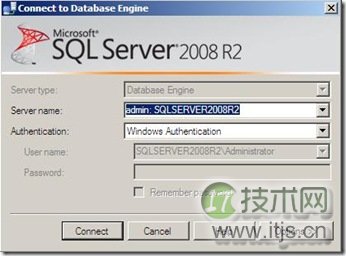
假如连接报错: “不支持管理员连接”,英文为:"Cannot connect to admin:SQLSERVER2008R2."
原因为:This is because you can't connect to the DAC in object explorer. You can however connect to it from a query window from management studio click
假如连接报错:A connection was successfully established with the server, but then an error occurred during the login process. (provider: TCP Provider, error: 0 - The specified network name is no longer available.) (Microsoft SQL Server, Error: 64) 已成功与服务器建立连接,但是在登录过程中发生错误。
原因为已经存在一个活动的DAC连接,不允许建立第二个DAC连接。 这条描述可以在ErrorLog中看到。
检查当前已建立的的DAC连接命令如下:
SELECT t2.session_id FROM sys.tcp_endpoints as t1 JOIN sys.dm_exec_sessions as t2 ON t1.endpoint_id =t2.endpoint_id WHERE t1.name='Dedicated Admin Connection' SELECT t2.session_id FROM sys.tcp_endpoints as t1 JOIN sys.dm_exec_sessions as t2 ON t1.endpoint_id = t2.endpoint_id WHERE t1.name='Dedicated Admin Connection'
除本地支持DAC连接外,也可以打开远程DAC连接功能, 打开命令如下:
sp_configure 'remote admin connections', 1; GO RECONFIGURE; GO sp_configure 'remote admin connections', 1; GO RECONFIGURE; GO
本文就介绍到这里,假如想了解更多关于SQL Server数据库的文章,可以到这里:http://database.51cto.com/sqlserver/。